It was brought to my attention that Cura had a great Zig Zag feature that allowed people to define custom angles for that infill which resulted in some lovely patterns when you turn off perimeters and walls. It’s a popular technique with 3D Printed shoes. This Instagram post is a great example of the Cura ZigZag infill in action:
The community had started PrusaSlicer towards that journey of the powerful Zig Zag infill, but it lacked the ability to define those angles. It took a lot more digging than my other infills, but I was able to add a new “Export Mode” setting and duplicate the feature in PrusaSlicer.
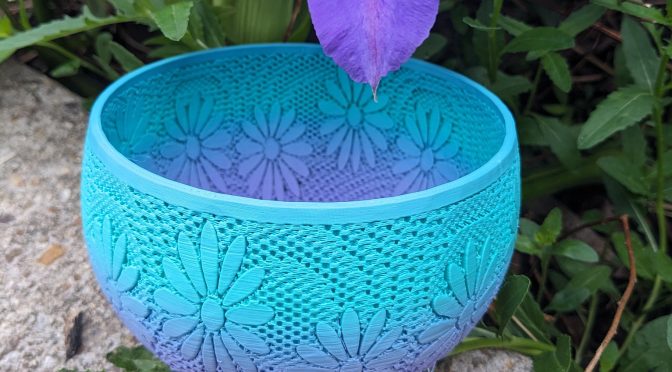
I did an awful lot of testing of the feature, including regression testing other infill types to make sure they weren’t impacted by the change. One of my favorite tests, however, was this “Daisy Infill Bowl” by 3D Print Bunny. She designed this with exposed infill specifically in mind. Using my new PrusaSlicer setting, I did infill angles of “90,0,90,0,90,0,270,180,270,180,270,180”. The result was stunning, particularly in this Eryone3D Teal & Purple.
Earlier this year, I made my first Pull Request in GitHub for PrusaSlicer! I am simultaneously excited…and nervous.
Earlier, I had blogged about how I made custom infills in the PrusaSlicer source code. Those custom infills worked very similarly where I defined points and had the slicer repeat those points over and over.
It was brought to my attention that Cura had a great Zig Zag feature that allowed people to define custom angles for that infill which resulted in some lovely patterns when you turn off perimeters and walls. It’s a popular technique with 3D Printed shoes. This Instagram post is a great example of the Cura ZigZag infill in action:
The community had started PrusaSlicer towards that journey of the powerful Zig Zag infill, but it lacked the ability to define those angles. It took a lot more digging than my other infills, but I was able to add a new “Export Mode” setting and duplicate the feature in PrusaSlicer.
I did an awful lot of testing of the feature, including regression testing other infill types to make sure they weren’t impacted by the change. One of my favorite tests, however, was this “Daisy Infill Bowl” by 3D Print Bunny. She designed this with exposed infill specifically in mind. Using my new PrusaSlicer setting, I did infill angles of “90,0,90,0,90,0,270,180,270,180,270,180”. The result was stunning, particularly in this Eryone3D Teal & Purple.
You can learn more about the code changes and the testing on the Pull Request in GitHub at Expansion of the Zig Zag Infill to Allow Control of Angles for Patterning like Cura by VickyTGAW · Pull Request #14073 · prusa3d/PrusaSlicer